Hanjia Automation Technology (Suzhou) Co., Ltd. Hanjia Automation Technology (Suzhou) Co., Ltd.Industrial Networking · Machine Safety · Edge Control 中文 | EN
Home / Products / Edge Control / MatriX Factory

MatriX Factory edge computing platform

原生融合 IT+OT+AI 的边缘计算平台 — 从设备级到车间级数字化底座 · 国产·自主·可控. This product sits in the MatriBOX software stack together with MatriX Control and WSCAD.

Software · under MatriBOX

Natively fusing IT + OT + AI — from device level to shop-floor data foundation

What MatriX Factory is

MatriX Factory (MXF) is an edge computing software platform developed by MatriBOX for its MX series edge intelligent controllers. It targets the device edge and the industrial shop floor, meeting the needs of shop-floor, production-line and single-machine deployments for high-volume real-time data acquisition, storage, analysis, modelling and AI inference. It can also be delivered as a modular, customisable and scalable AI / IT / OT platform.

The closed loop is control → data → cloud or local compute → strategy → control, which makes it easier to encapsulate process algorithms and decouple them from the hardware.

Value proposition — small, light, fast, smart

  • Small & light (Nano) — ultra-compact DIN-rail format for any control cabinet; lightweight container runtime, OTA updates, hardened industrial Linux, pre-installed software and a low resource footprint, with no complex system integration
  • Fast (Lite) — high-performance CPU, rich I/O, edge AI, few-shot model training and predictive maintenance; a drag-and-drop development environment shortens project cycles
  • Smart (Pro) — data-flow engine, low-code streaming, GPU acceleration and 300+ industrial protocols, with millisecond-level analysis and a high-availability architecture

Three software tiers and three hardware tiers can be combined freely to suit different scales and scenarios.
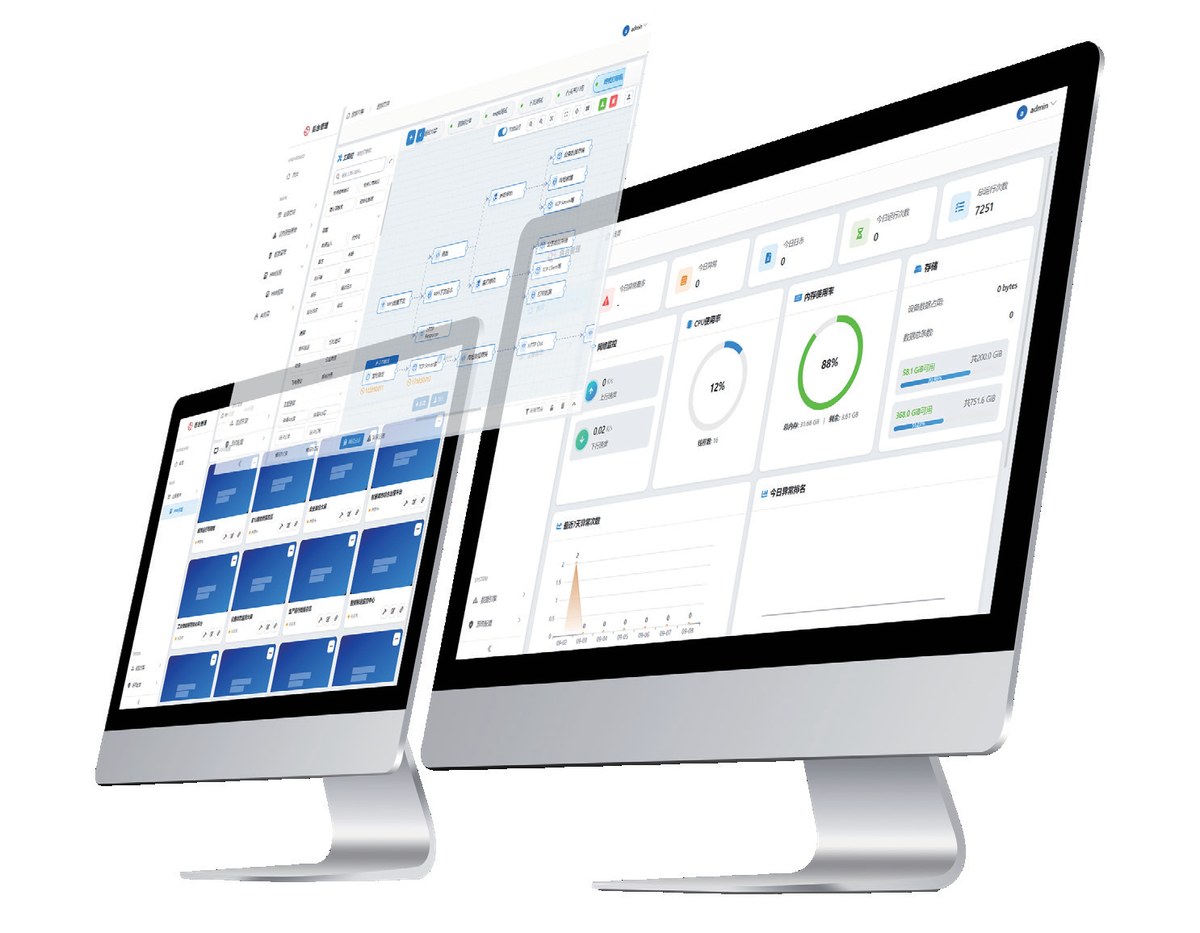
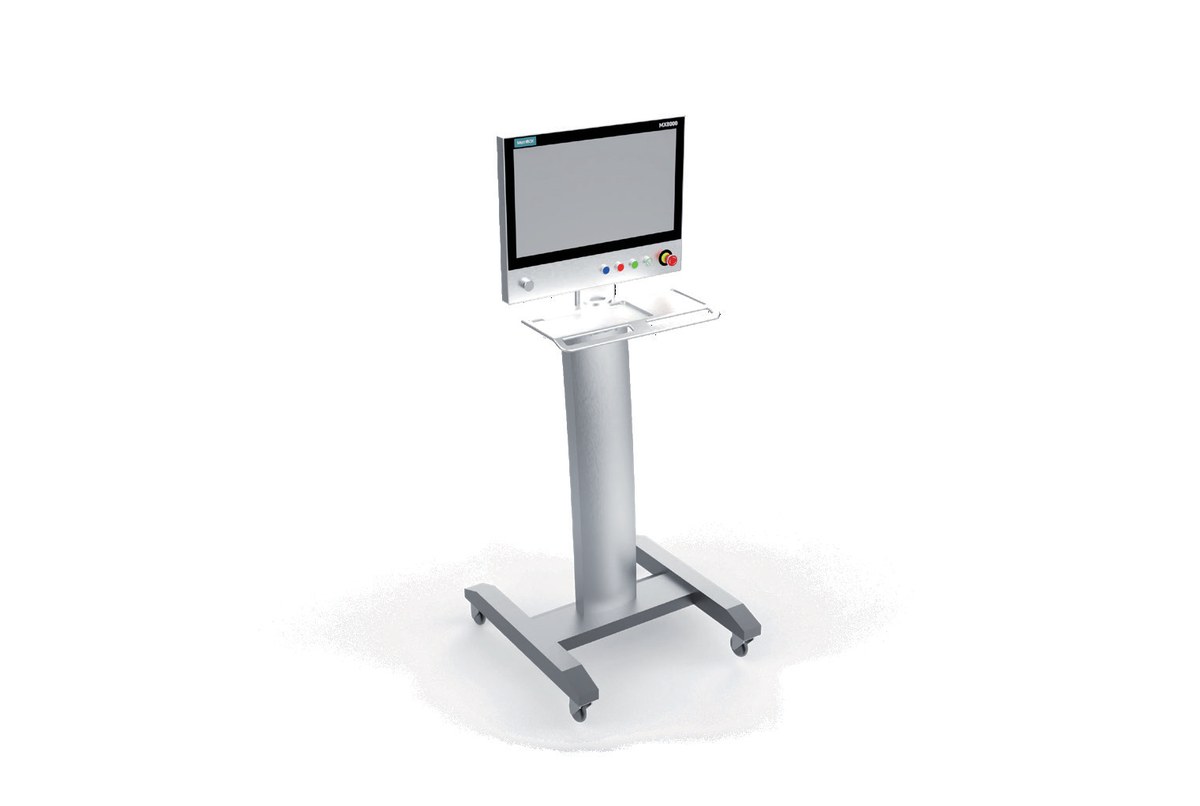
MatriX Factory product set
MatriX Factory product set — small, light, fast, smart; software and hardware deployed together
MatriX Factory tiers
Three tiers by scenario — Nano for single machines, Lite for lines, Pro for shop-floor level
Three tiers

Nano / Lite / Pro at a glance

ItemMXF NanoMXF LiteMXF Pro
TargetSingle-machine intelligent gatewayProduction line / flexible manufacturing islandShop-floor digital foundation
HardwareMX4000 / MX5000MX6000 / NVIDIA Jetson OrinMX8000 / MXF Cloud Data Center
Connected devices52050
Throughput500 × 5 byte/s500 × 20 byte/s500 × 50 byte/s
Private deploymentNoYesYes
CustomisationNoYesYes

MXF Nano highlights

  • Zero programming — device connection and data acquisition in 5 minutes
  • 20+ industrial protocol conversions, compatible with old and new equipment
  • Pre-processing at source cuts invalid data transmission by 95 percent
  • Breakpoint resume plus SM2/3/4 national cryptographic algorithms
  • Device health monitoring with early warnings; device and IT network isolation
  • Remote program download, diagnostics and maintenance, cutting travel for commissioning
  • Classified storage: real-time, cached, feature, historical, configuration and base data

MXF Lite highlights

  • Multi-sensor fusion and edge computing
  • Predictive maintenance and device health management
  • Protocol parsing and communication interfaces
  • SM2/3/4 cryptography for data security and real-time performance
  • Can act as an edge AI inference unit — MX6300 heterogeneous multi-core, or embedded NVIDIA Jetson Orin

MXF Pro highlights

  • Multi-node clustering with automatic failover and 99.99 percent availability
  • GPU / NPU acceleration supporting parallel multi-model inference
  • Cross-shop data sharing and an industrial application App Store
  • Builds a high-availability shop-floor data centre
  • Targets automotive and parts, energy and power, tobacco, oil and gas, smart mining and metallurgy
Capabilities

Data engine, HMI configuration and openness

Data engine

The engine packages hundreds of industrial protocol and function nodes into a data-flow, drag-and-drop programming model. It supports high-frequency acquisition, cleaning and encryption, storage, algorithm encapsulation, database access and two-way exchange with third-party platforms.
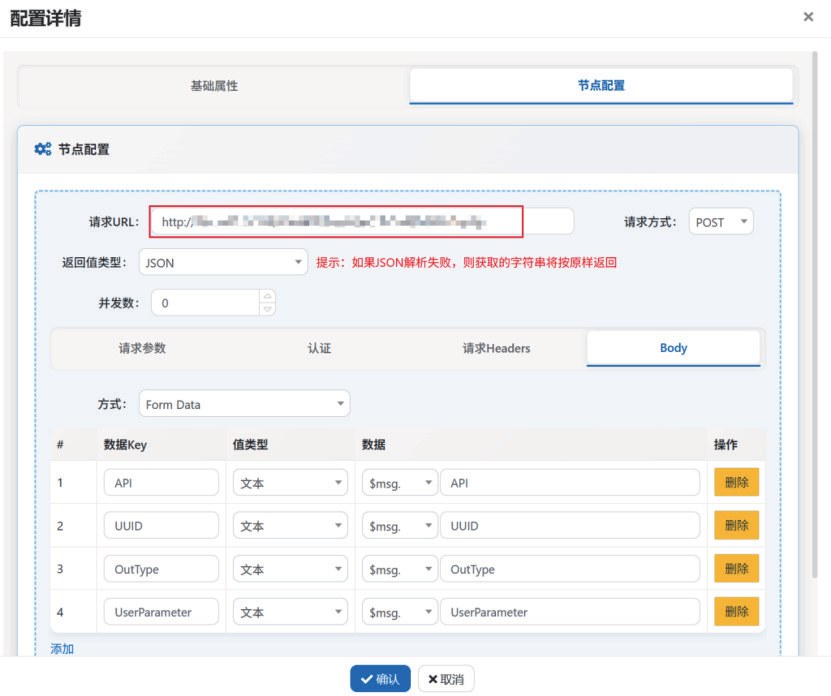
  • Low-code streaming framework with millisecond-level throughput
  • Drag-and-drop programming, component-based design, custom logic and visual conditional branching
  • Preset protocol nodes for Siemens, Beckhoff, Omron, Mitsubishi and many more
  • Node categories: trigger rules, data processing, industrial protocols, databases, API interfaces, notifications
MatriX Factory data engine
Data engine node configuration — drag-and-drop programming with visual node parameters

HMI configuration

  • Zero-code drag-and-drop configuration with a 300+ industrial component library
  • Millisecond-level data refresh with dynamic effects and alarm flashing
  • Responsive layout for large screens, PC, tablet and phone — design once, use everywhere
  • Rich chart types: industrial gauges and trend curves
  • Real-time and historical trend curves, groupable and comparable across multiple windows, with traceable records
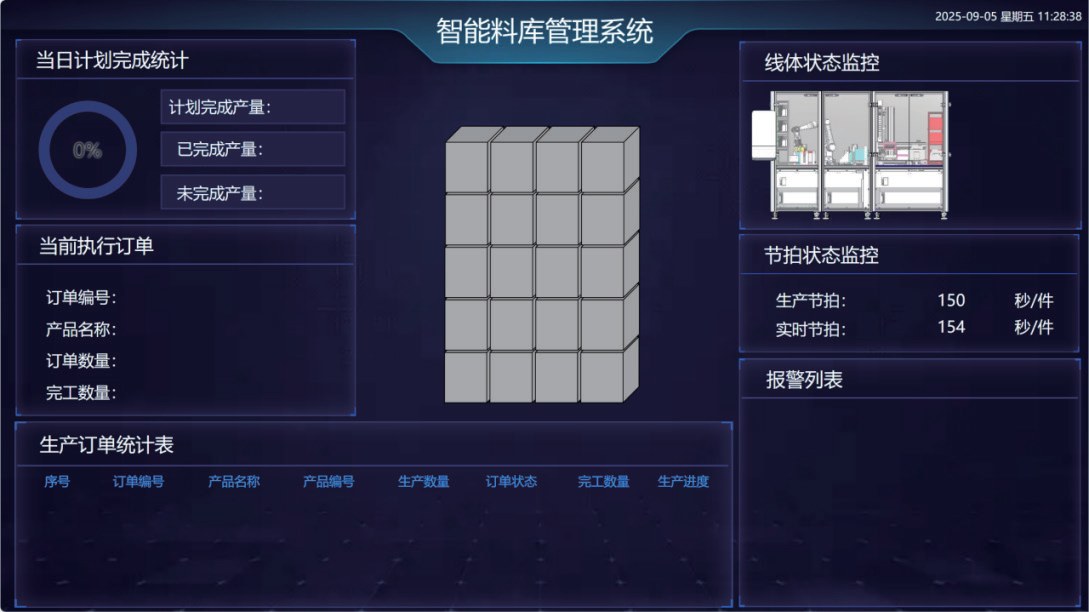
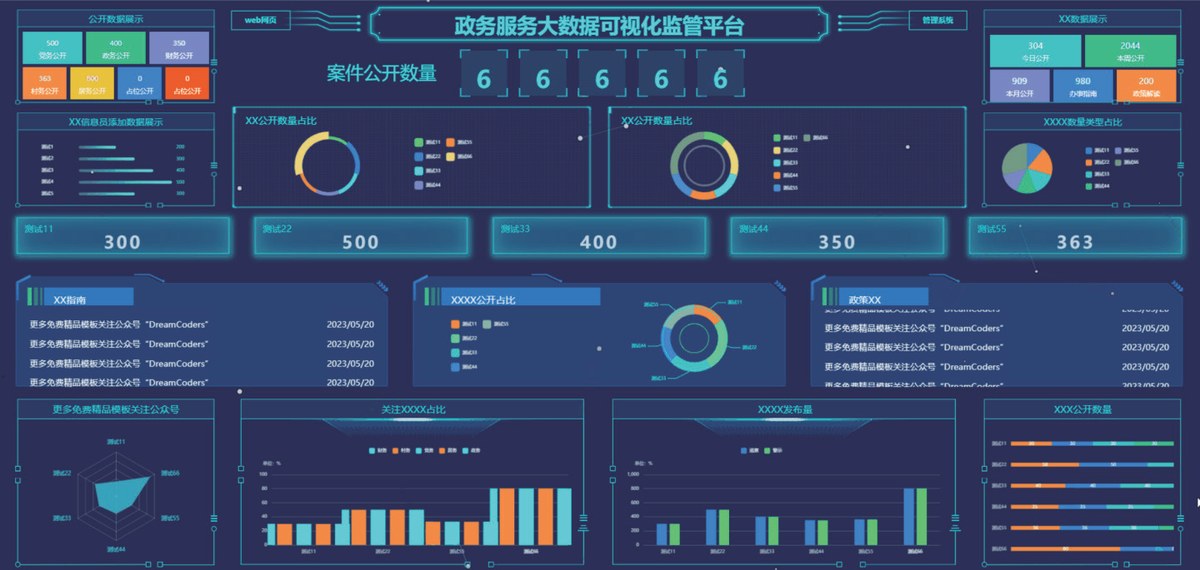
The two dashboards below are configuration examples taken from the manufacturer's manual (a warehouse-management template and a visualisation-supervision template). They are not delivered project screenshots and do not represent existing customer cases.

Openness and integration

  • Industrial protocols: Siemens S7, Modbus TCP / RTU, AB EtherNet/IP, Mitsubishi MC, OPC UA, ADS, Fins TCP
  • Databases: MySQL, Oracle, Sqlite, PostgreSQL, SqlServer, Access
  • Network: MQTT, RabbitMQ, Kafka, FTP
  • Notifications: Email, DingTalk, WeCom, Feishu, SMS
  • Edge AI: AIGC-assisted few-shot training models and common vision algorithms; built-in linear regression and DLinear models with inference executed on NPU / GPU
  • Three layers: IT systems (ERP / MES / PLM / BI / cloud) · OT devices (PLC / DCS / sensors / industrial equipment) · application ecosystem (MatriX Control / MatriX Factory / WSCAD)
HMI configuration example
HMI example 1 — warehouse-management template
HMI configuration example
HMI example 2 — visualisation-supervision template

Supported NVIDIA JetPack SDK components

Package / componentTypeFunction
Ubuntu 22.04操作系统提供基础系统环境(L4T),含引导加载程序、定制化 Linux 内核、NVIDIA 驱动程序、示例文件系统
CUDA ToolkitSDK / 平台在 NVIDIA GPU 上构建和运行加速应用的开发环境(编译器、数学库、开发工具)
cuDNN库高性能深度学习基元库,为深度神经网络框架提供优化过的核心操作实现
TensorRT库 / 运行时高性能深度学习推理优化器和运行时,用于部署低延迟、高吞吐量 AI 推理应用
DeepStream SDKSDK / 库构建基于 AI 的视频分析、多传感器处理应用的流媒体分析工具包
VisionWorks / VPI库跨硬件(PVA / GPU / CPU)的计算机视觉算法加速库
OpenCV库开源计算机视觉和图像处理库,JetPack 版本含针对 Jetson 的 GPU 与硬件加速优化
NVIDIA Container Runtime软件 / 工具支持 GPU 加速的容器运行时,简化容器化 GPU 应用的构建与部署
cuBLAS / cuFFT / cuSOLVER库CUDA 加速数学库:线性代数、傅里叶变换、求解器
PyTorch / TensorFlowAI 框架主流深度学习框架,在 JetPack 中预构建并针对 Jetson 优化
nvgstcapture / nvjpeg工具 / 库Jetson 专用工具与库,如摄像头捕获应用、JPEG 硬件加速编解码
Hardware and support

Supported hardware and service levels

ModelSpecificationDevicesThroughputPrivate deploymentCustomisation
MX4000四核 A55 2.0GHz;内存 4G;存储 32G(标配)/128G(MAX);算力 1Tops5500 × 5 byte/s不支持不支持
MX5000A76 四核 2.4G + 四核 A55;内存 16G;存储 64 / 128 / 256 / 512G5500 × 5 byte/s不支持不支持
MX6000NPU 算力 6Tops;可部署于 NVIDIA Jetson Orin 嵌入式 AI 计算机20500 × 20 byte/s支持支持
MX8000工厂级边缘集群50500 × 50 byte/s支持支持
MX4000 / 5000 / 6000 集成了符合 IEC 61131-3 的 MatriX Control。按设备每秒 100KB 数据计算,128G 存储约可保存 20 天数据。表中规格取自厂家手册,部分字段手册未逐一列出,选型前请与我们核对。

Service levels

ItemStandardAdvancedPremium
响应时间8 小时4 小时1 小时
远程支持5×87×167×24
现场支持72 小时24 小时24 小时
系统健康检查每季度每月每月

Service capabilities: 私有化部署, 定制化开发, SLA 服务等级, 7×24 NOC 中心, 专家团队(工业自动化与 AI 领域)

Service flow

  • 问题提交(多渠道提交工单、自动分配优先级)
  • 远程诊断(专家远程连接、快速定位问题)
  • 解决方案(远程实施或安排现场)
  • 跟踪回访(问题解决后跟踪回访)

Resources: 产品手册, 技术白皮书, 视频教程, API 文档, 常见问题, 社区论坛

Manufacturer hotline 4000-322-300; support@matribox.com; www.matribox.com. This page consolidates MatriBOX product material; contractual service terms follow the manufacturer's agreement. We can also handle product selection and technical support directly.

Not sure whether you need Nano, Lite or Pro?

Tell us your device count and data point count, and whether you need edge AI inference and private deployment, and we will propose a configuration.

Get selection support ← Back to Edge Control